- John Gleep capsule art: the official Steam artwork set for the alien pachinko roguelike
- Best sources: Steam's own asset CDN and the official press kit, both confirmed live
- Key files: Library Hero image, blurred hero background, and transparent logo PNG
- Art identity: neon casino-noir built around the green alien gambler
- Usage rule: credit monthbug and offbrand games in every fan project
What Is John Gleep Capsule Art?
John Gleep capsule art is the collection of promotional images Steam uses to represent JOHN GLEEP, the dual-screen intergalactic pachinko roguelike from developer monthbug and publisher offbrand games, which launched on Steam on November 11, 2026. Because capsule art appears in search results, store listings, wishlists, and library grids, it is the single most repeated visual players associate with the game.
The artwork leans hard into the game's identity: a tiny green alien gambler with glossy black eyes, glowing casino neon, and a deep-space backdrop. That consistency across every Steam slot is what makes the capsule set so useful for wiki builders and content creators.
Video Highlights:
- Shows the dual-screen UFO and casino loop that defines the game
- Displays the neon casino-noir palette used across all promo art
- Features the green alien gambler design in motion
- Works as a color reference for matching fan graphics to the official style
Capsule art is not one image but a set of slots, each with its own job on Steam:
| Steam Slot | Format | What It Shows | | Store header capsule | Wide banner | Key art with the game logo | | Library capsule | Vertical tile | Compact art for grid views | | Library hero | Wide background | Atmospheric space scene behind the page | | Logo overlay | Transparent PNG | The JOHN GLEEP wordmark layered on top |
Every official JOHN GLEEP asset comes from monthbug and offbrand games through Steam's asset network. Official files are confirmed live as of November 2026, so there is no reason to pull images from third-party aggregator sites that may compress or alter them.
Official Capsule Art Assets and Where to Get Them
Steam's public asset configuration for JOHN GLEEP exposes three directly usable files, and the publisher's press page rounds out the set. These links resolve to Steam's own CDN, which means fast loading and guaranteed authenticity.
| Asset | Format | Source | Best Use | | Library Hero | Wide JPG | Steam CDN hero image | Wiki banners, article headers | | Library Hero Blur | Softened JPG | Steam CDN blurred hero | Page and section backgrounds | | Official Logo | Transparent PNG | Steam CDN logo, 2x | Overlays, watermarks, headings | | Full press bundle | Mixed assets | Official press kit page | Articles, reviews, coverage | | Store screenshots | In-game captures | Steam store page | Gameplay and UI references |
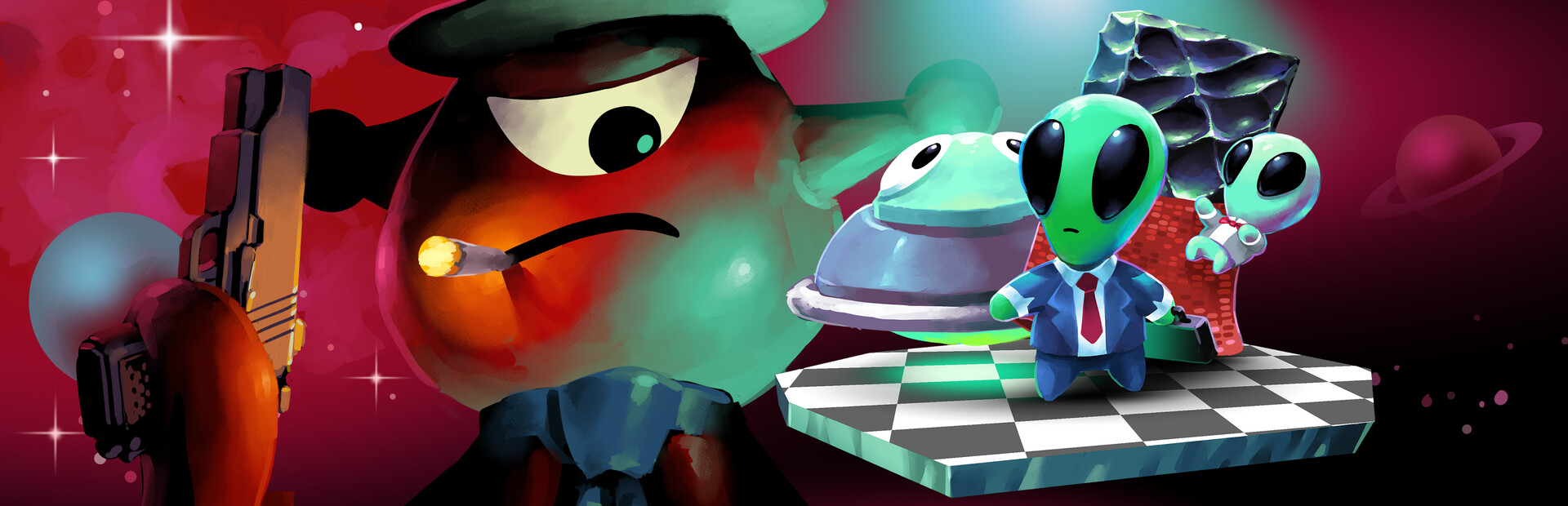

The hero and its blurred variant are designed to work as a pair: the sharp hero carries the artwork while the blurred version sits behind text without fighting it for readability. The logo's transparent background makes it the safest choice for layering over custom layouts.
Steam's CDN links load quickly and are reliable, but downloading a copy and hosting it yourself protects your pages if the developer ever swaps assets after a content update. For a wiki, hosting your own copies with an attribution line is the more durable setup.
Beyond the static files, new art surfaces through the developer's own channels: the official Discord, the official X account, and the monthbug YouTube channel regularly carry trailers, clips, and event graphics before anywhere else.
The Art Style Behind the Capsule
The capsule art works because every element reinforces the same idea: a criminal casino operation running out of a flying saucer. Understanding the pieces helps you build fan graphics that actually look like they belong to the game.
| Element | Description | Where It Appears | | Green alien gambler | Tiny figure, glossy black eyes, black suit, red tie, mischievous grin | Capsules, logo area, trailer | | Casino neon | Glowing chips, magenta and cyan lighting accents | Key art and store screenshots | | Deep space backdrop | Dark blue-black field with subtle cosmic detail | Library hero background | | UFO motifs | Saucer shapes and abduction imagery | Trailer and gameplay captures | | Casino-noir tone | Playful crime-comedy mood with neon overload | All official materials |
The palette is deliberately narrow and high contrast, which is why the art reads clearly even at small capsule sizes:
Neon Alien Green
- Primary brand color
- Character and accent glow
- Dominant in logo surroundings
Cosmic Cyan
- Exploration and space
- Planets and sci-fi details
- Balances the warmer neons
Casino Magenta
- Gambling and rewards
- Chips, jackpots, rare wins
- Strongest in casino-side art
Alert Red
- Danger and debt
- Ties, alarms, high-risk cues
- Used sparingly for punch
JOHN GLEEP is frequently confused with astronaut John Glenn in search results. When sourcing or tagging capsule art, always verify the monthbug / offbrand games credits and the pachinko roguelike description before adding anything to your project.
How to Use Capsule Art in Fan Content
Getting good results from the capsule set is mostly about matching the right file to the right job and keeping the attribution intact. The following workflow covers the common wiki and content-creator cases:
Pick the Right Asset
Use the Library Hero for wide banners, the blurred hero for backgrounds behind text, the transparent logo for overlays, and press kit materials when you need a broader selection for an article.
Check Resolution Before Cropping
Steam serves high-resolution versions of these assets, including 2x files like the logo. Crop from the largest available version so thumbnails and social cards stay sharp.
Keep the Wordmark Legible
Do not stretch, recolor, or stack heavy effects on the JOHN GLEEP logo. If you need a modified look for a fan banner, build it around the hero art instead and place the logo cleanly on top.
Credit the Developers
Add a short line such as "Artwork © monthbug / offbrand games" to image captions or your project's credits page. It takes seconds and keeps the community relationship healthy.
Link Back to Official Pages
Pair any capsule art use with a link to the official Steam page so readers can find the game directly.
For quick reference, these are the boundaries that keep fan use problem-free:
| Do | Avoid | | Use Steam CDN or press kit files | Ripping art from random aggregator sites | | Credit monthbug and offbrand games | Presenting the art as your own creation | | Keep the official logo unmodified | Recoloring, stretching, or watermarking the wordmark | | Link to the official store page | Using the art to imply official endorsement |
Wallpapers, thumbnails, and wiki headers built from capsule art are normal community activity, but never present edited art as official material, and do not place the assets behind paywalls or exclusive downloads.
Capsule Art vs Trailer vs Press Kit
The capsule set is only one of three official visual sources, and each serves a different purpose in a content project. Choosing the right one saves time and produces better-looking pages:
Capsule Art
- Static and instantly recognizable
- Consistent across Steam slots
- Best for headers, tiles, thumbnails
Official Trailer
- Shows art style in motion
- Reveals neon palette under engine lighting
- Best as a color and style reference
Press Kit
- Broadest official asset bundle
- Built for articles and coverage
- Best for writers and media projects
If you are setting up a wiki or starting a content series, work through this list once and your visual foundation is done:
Capsule Art Setup for Wiki Editors:
- Download the Library Hero, Hero Blur, and logo PNG from Steam's CDN
- Bookmark the official GamesPress press kit page for future asset drops
- Verify fan graphic colors against trailer footage before publishing
- Add an attribution line to every image caption
- Follow the official Discord and X account for new seasonal art
When a fan graphic looks slightly off, the problem is usually the neon tones. Pausing the official trailer on casino scenes gives you the truest reference for how green, cyan, magenta, and red actually render in the game's lighting.
Frequently Asked Questions
Q: Where can I download official John Gleep capsule art?
The fastest sources are Steam's own asset CDN, which provides the Library Hero image, the blurred hero background, and the transparent logo PNG, plus the official press kit page hosted for media coverage. The Steam store page also carries gameplay screenshots. All of these were confirmed working as of November 2026.
Q: Can I use John Gleep capsule art in my own videos or wiki?
Using official art with clear credit to monthbug and offbrand games is standard community practice for wikis, thumbnails, and fan articles. The key boundaries are to never claim the art as your own creation, never present edited versions as official material, and never use the assets to imply the developers endorse your project. When a use case feels uncertain, the official Discord is the right place to ask.
Q: Does the capsule art differ between the main game and the Demo?
The Demo has its own separate Steam store page with its own asset set, while the main game carries the full capsule configuration including the library hero and logo files. The visual style is consistent across both, but for wiki branding and fan projects you should use the main game's assets since they represent the full release that launched on November 11, 2026.
Q: Why does John Gleep's capsule art look so neon-heavy?
The artwork reflects the game's core identity as an alien casino-noir roguelike. The green alien gambler, glowing casino chips, and dark space backdrop are the three pillars of the design, tied together by a deliberate palette of neon green, cyan, magenta, and alert red. The high-contrast approach also keeps the art readable at the small capsule sizes Steam uses in search results and grid views.
With the hero, blur, and logo downloaded and credited, your JOHN GLEEP project has the same visual foundation as the official store page. From there, gameplay screenshots and trailer captures fill in the action-side content.